

Products to compare
A flexible APS-C zoom and a closer-view 50mm prime
These compatible lenses represent different tabletop workflows on an APS-C EOS R body. The MPB link contains individual used RF-S 18-45mm zooms, while the Adorama link is a new RF 50mm f/1.8 prime. The links are uncommissioned. Verify the selected item, condition, contents, price, availability, and current terms.
Choose the RF-S 18-45mm when changing product sizes or a limited workspace makes framing flexibility the tested priority. Choose the RF 50mm when its fixed view fits the set and its 0.25x maximum magnification records a required closer detail. Decide from supported photographs with matched product marks, lighting, depth of field, and output size.
These links lead to product listings or manufacturer buying options. PriceChomp earns no commission from them. How our links work.
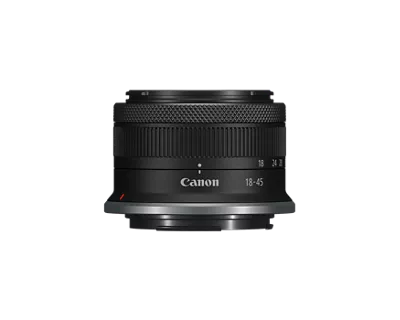
For varied product sizes in a fixed workspace
Used Canon RF-S 18-45mm f/4.5-6.3 IS STM
APS-C-focused RF-mount 18-45mm standard zoom with optical stabilization and a variable maximum aperture.
- Why choose it
- Canon specifies an 18-45mm range, 0.16x maximum magnification at 45mm, optical stabilization, and an approximate 130-gram weight. The zoom can test several repeatable framings before the camera or set has to move.
- The tradeoff
- Its maximum aperture changes from f/4.5 to f/6.3, and its 0.16x maximum magnification may not fill the frame with a required small detail. Inspect autofocus, stabilization, rings, the retracting mechanism, glass, and mount on the selected used copy.
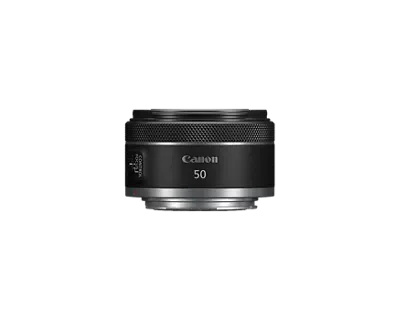
For a fixed 50mm view and closer detail
Canon RF50mm F1.8 STM
Canon RF-mount 50mm f/1.8 prime for EOS R cameras; covers full-frame and APS-C sensors.
- Why choose it
- Canon specifies a 50mm focal length, 0.30-meter minimum focusing distance, 0.25x maximum magnification, f/1.8 maximum aperture, and approximate 160-gram weight. Test the real object size, working distance, and depth of field.
- The tradeoff
- The fixed view can force a camera-position change as product sizes vary, and f/1.8 can leave too little depth for an angled object. It is not designated as a macro lens and has no in-lens stabilization specification.
Product details checked against the linked manufacturer and retailer pages. These are research-based comparisons, not hands-on tests. Check the selected model, current price, availability, and return terms before buying.
Define the product photographs before choosing the lens
Product photography can mean a full object on a plain background, a close detail, a contextual scene, or a repeatable catalog series. List the required outputs, aspect ratios, product sizes, and final display sizes before comparing lenses. A lens that works for a watch detail may not fit a chair inside the same room, and a flexible framing tool may matter more than a wider aperture when every item must occupy the same part of the frame.
Write the smallest and largest subjects you expect to photograph, the available table depth, the farthest camera position, and the closest safe distance from the front element to the product. Add the room required for lights, reflectors, stands, and your own access. This turns lens choice into a measurable set problem instead of a style label.
| Required image | Hold constant | Record before shopping |
|---|---|---|
| Full product | Backdrop and output ratio | Frame coverage from the permitted camera position |
| Label or control detail | Product orientation and camera angle | Closest useful view with room for light |
| Three-quarter view | Camera height and subject mark | Perspective and background clearance |
| Repeatable series | Tripod mark, crop, and lighting | How quickly each product can match the template |
Fit the frame from the workspace you actually have
Canon specifies an 18-45mm range for the RF-S zoom and a fixed 50mm focal length for the RF prime. On an APS-C camera, the 50mm view is narrower than the zoom at every setting. That can be useful for isolating a smaller object, but it can also force the camera farther from a large product than the room allows.
Place the largest product on its real background and mark the camera position that leaves enough room for lights and access. Preview 18mm, 35mm, 45mm, and 50mm where your current equipment permits. Record whether the subject fits, whether the background edges stay outside the frame, and whether the camera position changes the shape relationships you want. A lens that fits only after moving the set is not the simpler workflow.
Separate close focus from a macro promise
Minimum focusing distance says how close the camera can focus, while maximum magnification says how large the subject can be recorded relative to the sensor. Canon lists a 0.20-meter minimum focusing distance at 18mm and 0.16x maximum magnification at 45mm for the RF-S zoom. Canon lists a 0.30-meter minimum focusing distance and 0.25x maximum magnification for the RF 50mm prime.
Those numbers make the prime the closer-view candidate in this pair, but Canon does not designate it as a macro lens. Test the smallest label, connector, texture, or control you must show at the intended output size. Leave enough distance for lighting and avoid assuming that the shortest focusing distance automatically gives the cleanest or most useful composition.
- Record the smallest subject area each lens can fill at a usable working distance.
- Check whether the lens or camera blocks light when moved close.
- Judge edge detail and focus across the product, not only the center point.
- Choose a true macro option if neither candidate records the required detail.
Lock camera position before judging perspective
Changing camera position changes the relative size of near and far parts of the product. Changing focal length from the same position changes framing without creating the same perspective shift. For a fair comparison, first hold the tripod position and product mark constant, then compare the available crops. After that, move the camera only when the actual assignment permits it.
This matters for boxes, bottles, furniture, and any object whose proportions must look consistent across a series. Mark the tripod feet, camera height, table edge, and product center. If the prime requires a new position, treat the resulting perspective as part of its workflow rather than cropping both photographs until the difference disappears.
Use aperture for the depth the product needs
The RF 50mm opens to f/1.8, while the RF-S zoom has a variable f/4.5-6.3 maximum aperture. The wider prime can admit more light and reduce depth of field, but a product photograph often needs several surfaces, controls, or lines to remain acceptably sharp. The widest aperture is therefore an option to test, not an automatic advantage.
Photograph the same angled product at the apertures you would realistically use. Keep the focus point and output size consistent. Record which front and rear details remain useful, how the background changes, and whether diffraction or noise becomes visible at the delivery size. If the desired depth requires a smaller aperture, solve the exposure with controlled light, stable support, or an appropriate longer exposure before paying for unused aperture.
Control light and support before crediting stabilization
Canon rates the RF-S zoom for four stops of in-lens optical stabilization under its stated test conditions. That can help with some handheld camera movement, but a static product set gives you another option: fix the camera on stable support and control the exposure. Stabilization does not correct a moving product, a shifting backdrop, or reflections that change when the operator moves.
Run one handheld test and one supported test at the same framing and final output size. Use a release delay, remote control, or careful shutter technique so touching the camera does not decide the result. If the supported photograph is the repeatable workflow, judge the lenses on framing, working distance, depth of field, and handling rather than awarding the purchase to the stabilization label.
Test reflective edges and backgrounds with the real setup
Glossy products, glass, polished metal, and screens reveal the position of the camera, lights, room, and operator. A different focal length can change the camera position needed for the same framing, which can also change what the product reflects. Test the lens inside the complete lighting arrangement instead of judging an isolated chart.
Photograph one reflective object, one textured object, and one object with straight edges. Inspect the intended crop for unwanted reflections, edge stretching, background seams, flare, and color consistency. Correct the set and camera position before assuming that a more expensive lens is the only solution. The useful comparison is the repeatable finished image, not a single magnified corner.
Make focus repeatable across a product series
Both example lenses use Canon STM focusing systems and provide electronic manual focus control. The label does not decide whether autofocus will choose the intended logo, front edge, or reflective surface. Test the actual camera, lighting, product materials, and focus method together.
For a series, define a product mark and a focus target that can be reproduced. Record whether autofocus settles on the intended detail, whether manual focus can be repeated after a product change, and whether the zoom position or camera position drifts between items. If you plan to combine focus points, verify that the camera remains fixed and that the lens and editing workflow support the sequence you intend to make.
Price the complete tabletop setup
Build the delivered total for the exact lens and the equipment needed to use it. Include the hood, caps, compatible filters you truly need, tripod or copy stand, background, product supports, lights, modifiers, remote release, and any bag or storage change. A less expensive lens can still lead to the larger total if it forces a different room layout or support system.
For the used zoom, select the individual copy and save its condition report and included-item list. Inspect the glass, mount, rings, retracting action, autofocus, stabilization, and camera communication while the written remedy remains usable. For the new prime, separate the base lens from optional bundles, protection plans, financing, and promotional extras. Do not compare a model-page starting price with a complete new cart.
Run a three-product audition and decide
Photograph three objects with each candidate: the largest product that must fit the set, the smallest detail that must be legible, and a reflective or deep object that challenges lighting and focus. Keep the output ratio, background, camera height, and editing target consistent. Record setup time, camera position, focal length, aperture, focus method, crop, and any reshoot.
Finish with one sentence: Choose the zoom because ____ product sizes fit from the fixed workspace and ____ framings can be repeated without moving the camera. Choose the 50mm prime because its tested view fits the set, 0.25x magnification solves ____, and the required depth of field is reliable at ____. Choose neither when the test proves that a different focal length, true macro capability, tilt control, or support system is the real requirement.