

Products to compare
A stabilized APS-C zoom and a wider-aperture RF prime
These compatible lenses create different video workflows on an APS-C EOS R body. The MPB link contains individual used RF-S 18-45mm zooms, while the Adorama link is a new RF 50mm f/1.8 prime. The links are uncommissioned. Verify the selected item, condition, contents, price, availability, and current terms.
Choose the RF-S 18-45mm when several planned shots need different framing from one camera position or its optical stabilization improves your tested handheld clips. Choose the RF 50mm when its fixed view fits the sequence and f/1.8 improves the intended exposure or depth of field without causing unacceptable focus misses. Decide from recorded clips with the actual microphone and support.
These links lead to product listings or manufacturer buying options. PriceChomp earns no commission from them. How our links work.
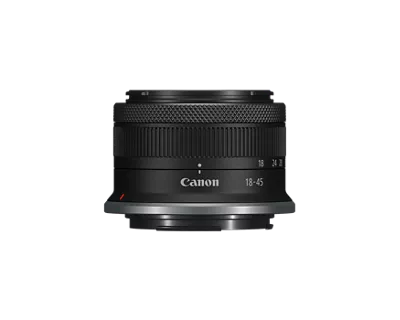
For reframing and tested handheld support
Used Canon RF-S 18-45mm f/4.5-6.3 IS STM
APS-C-focused RF-mount 18-45mm standard zoom with optical stabilization and a variable maximum aperture.
- Why choose it
- Canon specifies an 18-45mm range, optical stabilization, and an approximate 130-gram weight. Test every needed focal length, the planned camera moves, and the selected used copy before relying on it for a sequence.
- The tradeoff
- Its maximum aperture changes from f/4.5 to f/6.3, and stabilization does not control subject movement or replace deliberate support. Inspect autofocus, stabilization, rings, the retracting mechanism, glass, mount, and recorded sound.
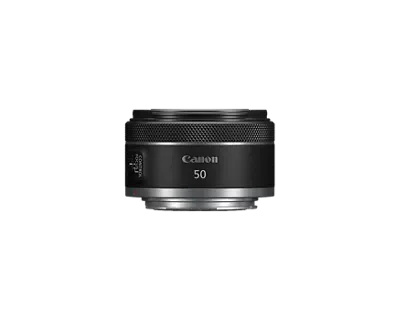
For one tested view and a wider aperture
Canon RF50mm F1.8 STM
Canon RF-mount 50mm f/1.8 prime for EOS R cameras; covers full-frame and APS-C sensors.
- Why choose it
- Canon specifies a fixed 50mm focal length, f/1.8 maximum aperture, and approximate 160-gram weight. Test the intended exposure, depth of field, focus transition, and microphone placement at the actual subject distance.
- The tradeoff
- The 50mm view can be too tight for an APS-C interior, and it cannot reframe without moving, cropping, or interrupting the setup. The wider aperture also makes focus accuracy more demanding when depth of field is shallow.
Product details checked against the linked manufacturer and retailer pages. These are research-based comparisons, not hands-on tests. Check the selected model, current price, availability, and return terms before buying.
Write the video sequence before shopping
A video lens has to connect several shots, not merely make one frame look attractive. Write the opening, middle, and closing shots you need. For each shot, mark the camera position, subject distance, whether the camera or subject moves, and whether dialogue must be recorded. This exposes the real constraint before a lens specification begins to influence the choice.
A zoom can cover several frames from one permitted position. A prime can make the operator move, crop, or change lenses. Those are useful disciplines only when the location, continuity, schedule, and sound setup allow them. If a room has one workable tripod position or a live event offers no second take, record that restriction now.
| Shot | Camera position | Movement | Audio or focus risk |
|---|---|---|---|
| Opening wide view | Back wall or fixed tripod mark | Locked or slow pan | Room sound and edge detail |
| Medium dialogue | Known distance from subject | Mostly static | Voice pickup and eye focus |
| Detail or insert | Close working position | Small handheld move | Focus transition and handling sound |
| Walk-through | Operator follows subject | Camera and subject move | Camera shake, focus, and footsteps |
Choose the view from the real shooting position
Focal length determines field of view, and sensor format changes how much of that view the camera records. On an APS-C camera, a fixed 50mm lens can be too tight for an interior even though it is physically compatible. An 18-45mm zoom gives several wider framing choices from the same position. That flexibility is valuable only if those views match the planned shots.
Put the camera on each planned mark and preview 18mm, 35mm, 45mm, and 50mm where your current equipment permits. Record whether the required edges fit, the subject remains large enough, and the background still supports the story. Do not judge a prime by stepping backward through a wall or judge a zoom from a position you cannot use during the actual recording.
Use stabilization for camera movement, not every movement
Canon specifies optical image stabilization for the RF-S 18-45mm lens, rated at four stops under its stated still-photo test conditions. That specification makes the zoom a relevant handheld candidate, but it is not a promise that walking footage will look like a supported tracking shot. Stabilization can reduce some camera movement. It does not stop a moving subject, control the operator path, or choose an intentional frame.
Test the exact camera and lens in five situations: a locked tripod shot, a handheld static shot, a short walk, a slow pan, and a deliberate focus transition. Review the full frame for edge movement, abrupt corrections, and framing drift. If the camera offers digital stabilization, repeat the test with it off and on so any crop or change in motion is visible in your own recording.
- Use a tripod or other support when the shot is supposed to be locked.
- Judge walking footage at the intended delivery size and frame rate.
- Keep subject movement separate from camera movement in the test notes.
- Do not buy a lens on a stop rating without recording the movement you actually need.
Use aperture to protect exposure and depth of field
Canon specifies an f/1.8 maximum aperture for the RF 50mm prime. The RF-S zoom has a variable f/4.5-6.3 maximum aperture across its range. A wider aperture can admit more light and can reduce depth of field, but the useful result depends on the chosen shutter speed, ISO, subject distance, framing, and focus accuracy.
For video, exposure and focus have to survive the sequence. Record the prime at f/1.8 and at the aperture you expect to use for adequate depth of field. Record the zoom at the focal lengths in the shot plan, watching for exposure changes when the maximum available aperture changes. If you plan to zoom during a take, verify that the exposure, focus, and framing transition remain acceptable rather than assuming the lens will hide the change.
Test focus behavior and sound together
Canon lists STM focus motors for both example lenses, and the EOS R50 includes Movie Servo AF and a 3.5mm stereo microphone input. Those facts establish available tools, not a guarantee that focus will track every subject or that a microphone will never capture lens, ring, operator, or stabilization sound.
Record a quiet-room focus transition with the camera microphone, then repeat with the microphone placement you would actually use. Listen on headphones. Test a face entering the frame, a hand moving toward the lens, and a rack between two fixed objects. Repeat in manual focus if that is part of the plan. The better lens is the one whose focus behavior and recorded sound remain usable in the intended setup.
Decide whether reframing belongs inside the take
A zoom lets the operator change framing without moving the camera or interrupting the setup. That can save time in a small room, interview, demonstration, or live event. A prime fixes the focal length, which can simplify continuity and encourage deliberate camera and subject positions. Neither approach is automatically more cinematic.
If the shot requires a visible zoom, test the move at the actual speed and recording settings. Check whether focus, exposure, handling noise, and composition stay controlled from start to finish. If the zoom is only for choosing a frame before recording, compare how quickly each lens can move between the planned views without disturbing lights, microphones, or subject marks.
Price and carry the complete video rig
Compare delivered totals for the setup that can record, not just the lens. Include the hood, required filters, microphone and cable, support, media, spare batteries, and any bag change. If bright conditions require a neutral-density solution for your chosen shutter speed and aperture, price the correct filter size and any step-up rings you can use safely.
For the used zoom, select the individual copy and save its condition report and included-item list. Inspect the glass, mount, rings, retracting action, autofocus, stabilization, and communication with the camera while the written remedy remains usable. For the new prime, separate the base lens from optional bundles, protection plans, financing, and promotional extras. Weigh the ready-to-record rig, since a small difference at the lens can change balance on a compact support.
Run a three-clip audition and decide
Record three 30-second clips with each candidate: a locked dialogue shot, a short handheld movement, and a focus transition. Keep the camera position, output settings, lighting, microphone placement, and subject marks consistent. Edit the clips into the sequence you planned. Judge framing coverage, visible movement, exposure continuity, focus misses, sound, setup time, and the number of lens or camera-position changes.
Finish the comparison in one sentence: Choose the stabilized zoom because ____ of the required shots need changing framing or steadier handheld operation, and its aperture is acceptable at ____. Choose the wider-aperture prime because the tested 50mm view fits ____, f/1.8 solves ____, and the focus plan succeeds at ____. Choose neither if the planned sequence exposes a different focal-length, support, audio, or exposure requirement.