

Products to compare
Two different upgrade paths in one RF system
These are concrete research examples, not equivalent substitutes. The Adorama link represents a new lens-first path, while the MPB link represents individual used body-first options. The links are uncommissioned. Verify the exact item, condition, contents, price, availability, and current terms.
Choose the RF 50mm lens only when its focal length and f/1.8 aperture solve the named failure on a compatible body. Choose an EOS R50 body only when a verified camera capability is the bottleneck and your compatible lenses still fit the assignment. Otherwise, test first and keep the current kit.
These links lead to product listings or manufacturer buying options. PriceChomp earns no commission from them. How our links work.
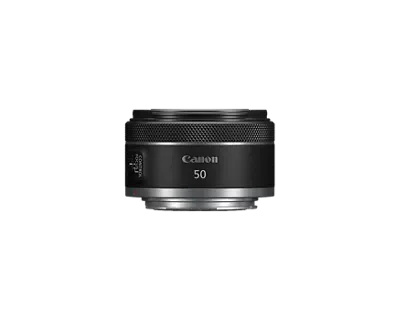
The lens-first example
Canon RF50mm F1.8 STM
Canon RF-mount 50mm f/1.8 prime for EOS R cameras; covers full-frame and APS-C sensors.
- Why choose it
- The Adorama page identifies the exact Canon RF 50mm f/1.8 STM model, while Canon provides the mount, focal-length, and aperture specifications needed to test the optical path.
- The tradeoff
- A fixed 50mm lens does not add a missing body port, recording mode, or autofocus feature. On an APS-C body, test the field of view before treating it as a general-purpose upgrade.
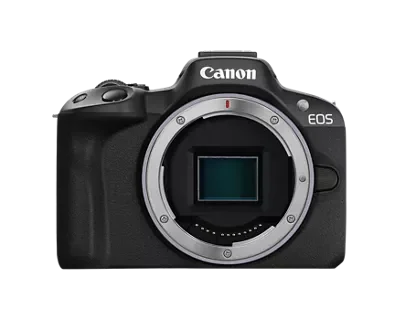
The body-first example
Used Canon EOS R50 at MPB
R50 body listings with individual condition reports, photographs, and included-item lists.
- Why choose it
- MPB lists individual used EOS R50 bodies with copy-specific condition, included items, and shutter-count information when supplied, giving you a unit to inspect after the body-first case is proven.
- The tradeoff
- A newer body does not fix the wrong focal length or a lens that is too slow for the assignment. Inspect the selected copy and complete system cost, not the model-page starting point.
Product details checked against the linked manufacturer and retailer pages. These are research-based comparisons, not hands-on tests. Check the selected model, current price, availability, and return terms before buying.
Start with the photograph that failed
Do not begin with a product announcement or a sale price. Write down three recent photographs or clips that your current setup could not make, then name the reason for each failure. A subject that stayed too small from the only safe position suggests a focal-length problem. Motion blur at the widest usable aperture suggests a light-gathering problem. Focus that repeatedly lost a moving subject may point to autofocus, technique, lens drive, or all three.
Separate equipment limits from setup and technique before assigning the failure to a body or lens. A slower shutter speed, unsuitable focus area, wrong recording mode, unstable support, or missed exposure setting can imitate a hardware limit. The upgrade earns its cost only when it changes a result after those inexpensive causes have been checked.
| Missed result | Likely place to investigate | Test before buying |
|---|---|---|
| Could not frame the subject | Lens focal length or shooting position | Borrow or rent the needed angle of view |
| Subject motion stayed blurred | Available light, aperture, shutter speed, or noise tolerance | Test the required shutter speed at the current location |
| Focus would not stay on the subject | Body AF settings, lens drive, light, or subject contrast | Repeat a known path with current firmware and settings |
| Video mode was unavailable | Body recording specification, heat, media, or output limits | Confirm the complete recording requirement in the manual |
Hold the camera system constant
A body-versus-lens decision is meaningful only inside a compatible system. Record the current mount, sensor format, lenses, batteries, flashes, microphones, cards, software, and adapters. A body that changes mounts can turn a single purchase into a replacement project. A lens that covers a larger format may fit the mount but produce a different angle of view on your current sensor.
Canon identifies the EOS R50 as an APS-C camera with an RF mount that accepts RF and RF-S lenses. Canon identifies the RF50mm F1.8 STM as an RF-mount 50mm f/1.8 lens. Those facts establish physical system compatibility, but they do not decide whether the resulting field of view or fixed focal length fits your work. Compatibility is the entry test, not the recommendation.
- List every current lens and the focal lengths you actually use.
- Mark accessories that would not transfer to the proposed body or lens.
- Confirm the exact mount and sensor coverage from the maker documentation.
- Do not count equipment you hope to sell as cash until the sale is complete.
Choose the lens-first path when the optical tool is missing
A lens-first upgrade is strongest when you can name an angle of view, maximum aperture, minimum focusing distance, stabilization behavior, or size requirement that the current lens cannot provide. The lens changes what reaches the sensor and how you can frame from an available position. A newer body cannot make a short lens reach farther or give a slow zoom an f/1.8 maximum aperture.
Use an exact lens as a test case rather than assuming that any new glass is an upgrade. The RF50mm F1.8 STM is a fixed 50mm RF lens with an f/1.8 maximum aperture. That can be useful when a fixed view and wider aperture solve a known problem, but it is not a general replacement for a zoom. On an APS-C body, test the field of view before ordering because the smaller sensor crops the image circle relative to a full-frame body.
Choose the body-first path when the capability lives in the camera
A body-first upgrade is justified when the missing capability cannot be supplied by a compatible lens. Examples include a required recording format, card interface, port, viewfinder behavior, control layout, burst behavior, autofocus feature, or reliability need. Confirm the exact feature in the manufacturer documentation and test the surrounding workflow, because a headline mode may require a particular card, crop, frame rate, cable, or thermal plan.
The EOS R50 provides a concrete checklist, not a universal recommendation. Canon specifies an APS-C sensor, RF mount, one SD slot compatible with UHS-I, a 3.5mm microphone input, clean HDMI output, and no headphone terminal. A shopper who needs headphone monitoring should not expect a lens purchase to add it. A shopper whose only problem is focal length should not treat those body specifications as a reason to replace a working camera.
Compare the complete upgrade paths
Build two carts that can perform the same named assignment. The lens-first cart includes the exact lens, hood if needed, filter only if the job needs one, and any support or case that becomes necessary. The body-first cart includes the body, enough batteries, compatible cards, adapters, media readers, cages, cables, and replacement accessories that do not transfer.
Then add transition cost. A new control layout may require practice. A higher data rate may add storage and computer time. A large lens may need a different bag or support. A used body needs immediate inspection while its remedy is available. Do not subtract an estimated future selling price from either cart. Record a completed sale separately if it happens.
| Cost layer | Lens-first cart | Body-first cart |
|---|---|---|
| Core item | Exact lens and selected condition | Exact body and selected condition |
| Compatibility | Mount, sensor coverage, autofocus, corrections | Lenses, adapters, batteries, cards, software |
| Required extras | Hood, support, case, or filter only when needed | Battery, media, reader, cable, cage, or adapter |
| Transition | Field-of-view and handling practice | Controls, file workflow, and setup time |
| Failure exposure | Decentering, focus, stabilization, or damage checks | Sensor, shutter, ports, controls, heat, and power checks |
Run the least expensive decisive test
Before buying, design one test that can disprove your preferred upgrade. For a lens, rent or borrow the same focal length and aperture class, then recreate the missed assignment. For a body, rent the exact model or use a store demonstration to verify the mode, control, autofocus, port, or workflow you need. Bring a compatible card and inspect your own files rather than judging the rear screen alone.
A useful test has a pass condition written in advance. For example: at the farthest permitted position, the subject must fill at least this much of the frame; or the camera must record the required format for the full planned clip while providing the monitoring connection you need. If the test does not reproduce the real constraint, it cannot justify the purchase.
- Use the same subject distance, light, and movement as the missed assignment.
- Keep exposure and output size comparable when judging results.
- Check the full workflow from capture through import and delivery.
- Save the result that would make you cancel the purchase.
Treat condition as a separate decision
New versus used is a second decision after body versus lens. A new lens offer and an individual used body listing are useful research examples, but they are not substitutes merely because their prices may overlap. First choose the upgrade path, then compare the same exact item and condition channel within that path.
For a used body, inspect the selected unit, shutter count when supplied, sensor, mount, card slot, ports, controls, screen, viewfinder, battery, charger, and included caps. For a lens, inspect the glass, mount, filter threads, switches, rings, autofocus, aperture, and stabilization if present. Save the current listing and written remedy terms with the order, and test before the remedy window becomes impractical.
Finish with a one-sentence purchase case
Write: I am replacing ____ because it prevents ____ under ____, and the proposed ____ passed this test: ____. Then write the complete delivered cost and the equipment that must change with it. If either sentence contains a vague word such as better, professional, future-proof, or sharper without a measurable consequence, the case is not finished.
Buy the lens first when the optical requirement is known and the current body completes the assignment. Buy the body first when a verified camera capability is the actual bottleneck and your current lenses still suit the work. Buy neither when the failure has not been reproduced or the proposed item has not passed a realistic test.