

Products to compare
One EOS R50 acceptance plan, two purchase paths
The Adorama link is the new black EOS R50 body-only model 5811C002, while the MPB link contains individual used EOS R50 bodies. The links are uncommissioned. Save the exact offer and current terms, then apply the same written acceptance checklist to the delivered camera.
Choose the new path when its complete current cost, contents, and remedies justify the premium. Choose the used path only after the selected SKU matches its saved unit record and passes the same still, video, control, card, and file-workflow checks. Keep neither camera with an unresolved repeatable fault or listing mismatch when a seller remedy remains available.
These links lead to product listings or manufacturer buying options. PriceChomp earns no commission from them. How our links work.
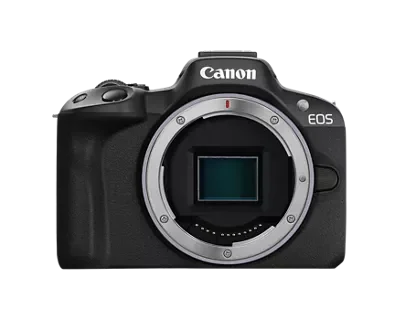
The new-body acceptance path
New Canon EOS R50 body at Adorama
Black EOS R50 body-only configuration; Canon manufacturer number 5811C002. Verify current cart contents and terms.
- Why choose it
- Adorama identifies the exact black body-only model, while Canon provides the box-content reference, current manual, support information, and product specifications needed to define the expected starting point.
- The tradeoff
- New condition is not a substitute for testing. Preserve the original packaging and included items, follow the current return requirements, and verify the exact camera through the real workflow before the available remedy closes.
The unit-specific used acceptance path
Used Canon EOS R50 at MPB
R50 body listings with individual condition reports, photographs, and included-item lists.
- Why choose it
- MPB lists individual R50 bodies with copy-specific condition, photographs, included items, and shutter information when supplied. The saved SKU gives the delivered unit a concrete condition and contents record to check.
- The tradeoff
- A cosmetic grade and shutter count do not prove every function. Test the exact body with known-good power, media, and a compatible lens, preserve the received condition, and act within the current unit-return requirements.
Product details checked against the linked manufacturer and retailer pages. These are research-based comparisons, not hands-on tests. Check the selected model, current price, availability, and return terms before buying.
Turn the remedy window into a test deadline
Before the package arrives, save the exact product page, selected used SKU if applicable, order confirmation, delivery record, stated condition, included items, and current return and warranty terms. Write the last date and required method for contacting the seller. Do not rely on a general memory of the policy because eligibility, timing, shipping responsibility, packaging rules, and defective-item procedures can differ.
Schedule the complete test early enough to repeat a suspicious result and contact the seller without rushing. Keep work, travel, and gift dates separate from the seller deadline. A camera that arrives before an important event still needs time for charging, setup, testing, file review, and a remedy if it fails.
| Record | Evidence to save | Why it matters |
|---|---|---|
| Exact offer | Model, configuration, condition, SKU, and included items | Defines what should arrive |
| Seller remedy | Current deadline, contact method, packaging, and shipping rules | Defines when and how to act |
| Pass standard | Required still, video, control, and file results | Prevents vague acceptance |
| Observed fault | Repeatable steps, files, photographs, and messages | Separates evidence from suspicion |
Preserve delivery evidence before opening
Photograph every side of the shipping box, label, visible damage, seals, and internal packing as you open it. Record the delivery time and camera serial number without publishing them. For a used unit, compare the body and accessories with the saved unit photographs and itemized listing, not with another copy on the model page.
Keep the outer carton, product box, inserts, caps, bags, ties, manuals, promotional items, and every accessory together. Adorama and MPB both publish condition and return requirements that make the received package part of the remedy record. Do not discard or repurpose anything until the camera has passed and the decision is final.
Check identity and contents before powering on
Match the model, color, body-only or kit configuration, region, and serial on the camera, box, invoice, and saved listing. For the black EOS R50 body example, Canon lists the body, R-F-5 camera cover, EM-200DB strap, LC-E17 charger, LP-E17 battery, battery cover, and shoe cover as the reference box contents. The exact retailer offer controls what you bought.
A used copy can have a different itemized set, including original or third-party power equipment. Record each received item and any mismatch before substituting your own accessory. A missing cap, charger, battery, or promised manual is a seller-resolution question even if the camera can be made to work with something already in your bag.
Let a cold camera acclimate and inspect it safely
If the package moved from cold conditions into a warm room, leave the camera sealed while it approaches room temperature. Canon warns that condensation can form inside the camera and says not to use it or remove the lens, card, or battery until moisture has evaporated and the camera has adjusted. Do not create a fault while trying to find one.
Under good light, inspect the body, mount, contacts, doors, hinges, screen, viewfinder surround, hot shoe, ports, tripod socket, strap points, battery chamber, and card slot. Compare used wear with the saved condition record. Do not scrub contacts, probe the sensor, open the body, or attempt a repair. Photograph an unexpected mark before cleaning anything.
Build one known-good test setup
Charge the received battery with the intended charger, but keep a known-good compatible battery available to isolate a power problem. Use one known-good compatible lens and one qualified memory card whose data has already been copied elsewhere. Label every substituted test item so the record shows what came with the camera and what came from your kit.
Canon instructs users to format a new card, or a card previously formatted by another device, in the camera. Formatting erases the card, including protected files, so confirm the backup first. If the received card or battery behaves badly, repeat the relevant test with the known-good item before assigning the fault to the body.
Record the starting state before changing it
Photograph or write down firmware version, date and time, language, file format, autofocus mode, exposure mode, image stabilization choices, power-saving settings, file numbering, wireless connections, and custom controls. A used camera may contain another owner's settings; a new camera may still need date, time, and region setup.
Make a short baseline sequence before updating firmware or resetting the camera, unless a safety notice requires otherwise. Then use Canon's current manual and support information for any reset or update. This order preserves the received condition while still letting you determine whether a problem belongs to configuration, firmware, an accessory, or hardware.
Run a repeatable still-image sequence
Photograph the same detailed, evenly lit subject at a near, middle, and distant focus point. Use single autofocus, continuous autofocus if you need it, manual focus, several apertures, and both the screen and viewfinder. Add a short burst and ordinary single frames. Keep shutter speed high enough to remove hand movement from the focus question, or use stable support.
Review the files at the output size you actually use, then inspect full resolution for repeatable defects. A single soft frame can come from movement, depth of field, focus mode, lens behavior, or technique. Repeat the same failure with a stable target, known-good lens, and documented settings before calling the body defective.
Separate sensor marks from display and lens problems
Photograph an evenly lit plain surface at a small aperture with the lens deliberately defocused. Change orientation and repeat. A mark that stays in the same file position deserves investigation; a mark that moves with the subject or appears only on the rear screen points elsewhere. Test a second known-good lens before assigning edge softness or flare to the camera.
Canon says a commercially available blower may be used for dust or debris visible in images, but advises service when smudges remain. Do not touch the sensor, use canned air, or turn an acceptance test into an invasive cleaning attempt. Save the original files and contact the seller when a repeatable problem exceeds the safe manual procedure.
Exercise every control and connection you require
Operate each button, dial, switch, door, latch, screen position, viewfinder sensor, flash control, and menu path you expect to use. Insert and remove the battery and card normally. Test the microphone input, USB connection, HDMI output, shoe, wireless feature, or remote control only when it belongs to your planned work and you have a known-good compatible accessory.
A port that is never used does not need a destructive stress test, but a required port cannot be assumed good because the camera takes photographs. Record intermittent behavior with the exact cable, accessory, setting, and movement that reproduces it. Repeat with one known-good substitute before deciding which component failed.
Test the actual movie mode and file path
Record the resolution, frame rate, compression, audio source, focus mode, and duration your work requires. Watch for warnings, focus interruptions, unexpected stops, audio problems, excessive heat messages, or card errors. Canon notes that slow card writing can stop EOS R50 movie recording, so repeat a failure with media that meets the manual's requirement before blaming the camera.
Play the complete clip in the camera, transfer it through the intended reader or cable, and inspect picture, sound, duration, metadata, and edit compatibility. A successful ten-second sample does not validate a longer assignment. Stop if the camera displays a temperature or safety warning and follow the manual rather than forcing the test to continue.
Rehearse the real assignment and import workflow
Build the lens, card, power, strap, support, microphone, flash, or cable setup you will actually carry. Complete a small version of the real assignment, including startup, focus, exposure changes, playback, battery change, card change, shutdown, and packing. Time the workflow and note any step that depends on an item missing from the delivered package.
Import every file into the intended computer, folder structure, editor, and backup path. Confirm that stills and movies open, timestamps are correct, file numbering will not overwrite existing work, metadata identifies the camera, and the card can be accounted for. The camera is not accepted until its files complete the workflow that justified the purchase.
Classify the result and act before the deadline
Classify each concern as a listing mismatch, missing item, setup issue, incompatible accessory, intermittent symptom, repeatable defect, cosmetic difference, or unmet personal requirement. Keep the facts separate. A camera can match its description and still be wrong for your hand or assignment; it can also look excellent while a required function repeatedly fails.
For a suspected defect, preserve the original files, photographs, serial, settings, accessory list, exact reproduction steps, and seller correspondence. Stop experiments that risk damage or change the received condition. Contact the seller through the required method before the applicable deadline, follow the issued instructions, and keep shipment tracking and drop-off evidence if a return is authorized.